
Compare notation using the same guide: table spans, content reuse, and capabilities that depend on tools. Browse by problem; completing every exercise is optional.
Browse documentation topicsWhat is document markup?
A document markup language uses symbols or tags to identify headings, lists, and other content so tools can turn the text into web pages or PDFs.
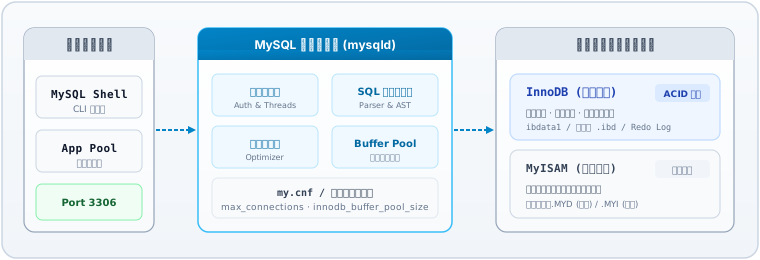
Use MySQL scenarios to compare headings, lists, tables and procedures. These are writing exercises, not complete installation or production-change instructions.
Your result: a Markdown or AsciiDoc source file. The preview helps you check the notation; publishing the file as a site comes next.
A realistic database scenario designed for technical writing and structured documentation practice.A few lines are enough to show structure
In Markdown, ## marks a level-two heading, a number followed by a period starts an ordered list, and paired double asterisks mark strong emphasis. These symbols tell the processor how to interpret the text.
## Pre-flight checks

1. Confirm port 3306 is free.
2. **Verify data directory permissions**.Pre-flight checks
- Confirm port 3306 is free.
- Verify data directory permissions.
Markdown and AsciiDoc are lightweight markup languages. DITA is an XML-based architecture for structured documentation: it also defines how content is divided, organized, and reused. All three express structure, but they address different needs.
Why technical engineering favors plain-text markup
- Decoupling content from presentation
- Focus on technical logic and accuracy without manual styling. Site-wide formatting is handled consistently by generators and themes.
- Compare changes
- Native integration with Git workflows. Every step change and parameter update is tracked as a line-level diff for clear team audit.
- Publish with compatible tools
- Compatible tools can turn source files into websites, PDFs or offline documents. Output formats and checks depend on the tools and configuration.
Plain text helps with change review and batch processing. Versioning, reuse and publishing still need an appropriate workflow.
How Markdown, AsciiDoc and DITA differ
Choose based on the content, reuse needs, and how much learning and maintenance your team can support.
| Dimension | Markdown | AsciiDoc | DITA |
|---|---|---|---|
| How you write | Use a few symbols, such as # and *, to write a document. | Plain text with more built-in features for technical documentation. | Describe content with XML elements, organize it into topics, and assemble them with a map. |
| Typical uses | Notes, blogs, READMEs, and product documentation. | Longer technical guides with cross-references, admonitions, and complex tables. | Documentation that shares content across products or versions and needs consistent structure and managed publishing. |
| Tables and spans | Pipe tables are extensions, such as GFM, with no native spans. Embedded HTML can add spans where the platform allows it. | Table syntax supports row and column spans. | The table element uses the CALS model and supports spans; simpletable covers simpler tables. |
| Content reuse | Usually handled by site tooling or extensions. | Use includes for files and attributes for repeated values. | Reuse topics in maps and content fragments through mechanisms such as conref. |
| Tools and effort | Start in a text editor; extensions vary between platforms. | Use a text editor and a processor such as Asciidoctor; there is more syntax to learn. | Often authored and validated in tools such as Oxygen, then published with tools such as DITA-OT. Learn topics and maps first. |
Choose Write a guide to start with Markdown and compare AsciiDoc notation. Choose DITA · Organize guides to explore modular Topic and Map compilation for complex suites.
Working with AI
Headings help select context, lists preserve order, and code blocks distinguish commands from explanations. Ask AI to check a specific section for missing conditions; the format alone does not guarantee retrieval quality or accuracy.
Example review prompt“Attached are ‘Before you begin’ and ‘Operation steps’. Review only for missing preconditions or verification commands. List issues explicitly without rewriting or inventing features.”
Standardized markup enables cleaner retrieval and automated parsing, but does not inherently guarantee model accuracy. Complex tables and architecture references still require rigorous human verification against product reality.
Engineering reference: Anthropic: Effective context engineering with clear document sections
Next, write a small section
- Read the task and syntax reference, then edit the starter material.
- Review the preview and check your work, then continue to the next lesson.
- View the complete result at any time, or download it to continue in your own tools.
Markdown and AsciiDoc cover the same guide. DITA exercises split it into topics and assemble a manual. Each format keeps its own draft; switching formats does not convert your writing.
Full text reference · Markdown, AsciiDoc and DITA
These reference answers share the data used by the interactive exercises. Read or copy them here, or download the Markdown version.
The MySQL fragments illustrate document structures, not complete production procedures. Reuse examples use a fictional product; validate them in your chosen toolchain.
Download the Markdown reference
Headings
Add a document title and a section heading. Leave a blank line between paragraphs.
Markdown
Use # Title for the document and ## Section for a section.
Leave a space after # and a blank line between paragraphs.
# MySQL Database Service

## Overview

MySQL is a widely used open-source relational database management system. Supporting ACID transactions, high-concurrency connections, and pluggable storage engines, it powers mission-critical web applications.
AsciiDoc
Use = Title for the document and == Section for a section. Leave a blank line before the body.
Leave a space after the equals signs and a blank line before the body.
= MySQL Database Service

== Overview

MySQL is a widely used open-source relational database management system. Supporting ACID transactions, high-concurrency connections, and pluggable storage engines, it powers mission-critical web applications.Unordered lists
Turn the three readiness checks into an unordered list.
Markdown
Prefix each line with - and a space. * or + also work.
Leave a space after - and a blank line before the list.
## Pre-flight checks

- Confirm that port 3306 is not in use.
- Verify read and write permissions on the data directory.
- Prepare a valid my.cnf configuration file.
AsciiDoc
Prefix each line with * and a space.
A space must follow the asterisk. Leave a blank line before the list.
== Pre-flight checks

* Confirm that port 3306 is not in use.
* Verify read and write permissions on the data directory.
* Prepare a valid my.cnf configuration file.Ordered lists
Turn the three operational steps into an ordered list starting at 1.
Markdown
Use 1., 2., and 3. followed by a space. Writing 1. on every line also auto-numbers.
The period needs a following space, or this may remain plain text.
## Initialize the instance

1. Run the initialization command to create data directories.
2. Start the mysqld service daemon.
3. Run the security script to set the root password.
AsciiDoc
Start each line with a period and a space: . step. Numbers are generated by the processor.
Use a period followed by a space; the numbers are automatic.
== Initialize the instance

. Run the initialization command to create data directories.
. Start the mysqld service daemon.
. Run the security script to set the root password.Bold and italics
Bold “systemctl start mysqld” and italicize “Before stopping, confirm that active client sessions can be interrupted”.
Markdown
**text** for bold, *text* for italics.
Keep the markers next to the text: **text**, not ** text **.
## Service lifecycle

To start the service, execute **systemctl start mysqld**. Use systemctl stop mysqld to stop it.

*Before stopping, confirm that active client sessions can be interrupted*.
AsciiDoc
*text* for bold, _text_ for italics. Leave spaces around markers.
Use paired markers. Keep spaces around the marked phrase in these examples to avoid adjacent-word boundaries.
== Service lifecycle

To start the service, execute *systemctl start mysqld*. Use systemctl stop mysqld to stop it.

_Before stopping, confirm that active client sessions can be interrupted_.Nested lists
Group instance planning into Production and Staging clusters, each with one nested item.
Markdown
Indent sublists with two spaces.
This example uses two leading spaces. Aligning the markers makes them siblings.
## Deployment environments

- Production cluster
  - Primary write node and read replicas.
- Staging cluster
  - Unit test databases and sandbox instances.
AsciiDoc
Use * for top level and ** for nested level.
Use two asterisks for the second level. Here ** is not bold markup.
== Deployment environments

* Production cluster
** Primary write node and read replicas.
* Staging cluster
** Unit test databases and sandbox instances.Images and links
Insert the architecture diagram with descriptive alt text, then add a “View full-size diagram” link.
Markdown
 for images, [link text](url) for links. Alt text should describe the image.
Images have an extra !. Use the supplied image path in the exercise.
## Architecture diagram

[View full-size diagram](/img/markup/mysql-architecture.svg)AsciiDoc
image::path[alt text] for block images, link:url[link text] for links.
Block images use two colons (image::) and occupy their own line.
== Architecture diagram

image::/img/markup/mysql-architecture.svg[MySQL architecture: connection pool, optimizer, and InnoDB engine]

link:/img/markup/mysql-architecture.svg[View full-size diagram]Tables
Organize engine, transaction support, and workload into a three-column table with two rows.
Markdown
GFM tables require header and delimiter rows. :--- aligns left, :---: center, ---: right.
The delimiter row is required. This is a GFM extension; pipe tables cannot merge cells.
## Storage engines

| Engine | Transactions | Workload |
| :--- | :--- | :--- |
| InnoDB | Supported (ACID) | High-concurrency online transactions |
| MyISAM | Not supported | Read-only historical archives |
AsciiDoc
Wrap tables with |===; leave a blank line after headers. Use [cols="1,2,2",options="header"].
Leave a blank line after the header and close the table with |===.
== Storage engines

[cols="1,2,2",options="header"]
|===
|Engine |Transactions |Workload

|InnoDB |Supported (ACID) |High-concurrency online transactions
|MyISAM |Not supported |Read-only historical archives
|===Merged cells
Markdown pipe tables have no native cell spans. This example uses HTML rowspan and colspan, which the publishing platform must allow. AsciiDoc supports row and column spans natively.
Markdown + HTML
This is embedded HTML, not native Markdown span syntax. Remove cells displaced by the span.
## Backup and maintenance plan

<table>
  <thead><tr><th>Category</th><th>Method</th><th>Description</th></tr></thead>
  <tbody>
    <tr><td rowspan="2">Physical backup</td><td>Cold backup</td><td>Direct data directory snapshot</td></tr>
    <tr><td>Hot backup</td><td>Continuous redo log tracking</td></tr>
    <tr><td>General policy</td><td colspan="2">Archive backups off-site and verify recovery regularly.</td></tr>
  </tbody>
</table>
AsciiDoc
Leading dot spans rows (.2+|); no dot spans columns (2+|). The specifier replaces the pipe (never write | .2+|). Remove any displaced cells.
== Backup and maintenance plan

[cols="1,1,2",options="header"]
|===
|Category |Method |Description

.2+|Physical backup |Cold backup |Direct data directory snapshot
|Hot backup |Continuous redo log tracking

|General policy 2+|Archive backups off-site and verify recovery regularly.
|===Code and literal text
Mark 1045 as inline code and preserve the two status lines in a literal block.
Markdown
Use backticks for inline code and a fenced block for multiple lines. The text label indicates plain text.
Use backticks, not apostrophes. Put each fence on its own line.
## Terminal status

The client returns error `1045` when credentials fail.

```text
State: Running
Active connections: 18
```
AsciiDoc
Use backticks for inline code and two lines of .... around a literal block.
Each delimiter is four periods, not an ellipsis.
== Terminal status

The client returns error `1045` when credentials fail.

....
State: Running
Active connections: 18
....Section links
Link “Instance maintenance” to its section, then try the link in the preview.
Markdown
Use [Instance maintenance](#instance-maintenance). This preview generates IDs from headings.
The target anchor must exist. Heading-ID rules can differ between platforms.
## Troubleshooting

See [Instance maintenance](#instance-maintenance) for permission and connection issues.
AsciiDoc
Use <<maintenance,Instance maintenance>>. The destination section already has a [[maintenance]] anchor.
The anchor names must match; the displayed link text may differ.
== Troubleshooting

See <<maintenance,Instance maintenance>> for permission and connection issues.Notes
Set the backup reminder apart before the mysqldump export instruction.
Markdown
> **Note**: text separates a reminder visually. A blockquote has no built-in warning severity.
Put > at the start of the line. A blockquote label and color do not define a standard warning level.
## Instance maintenance

> **Note**: Back up all databases before applying schema changes.

Export SQL dump files using mysqldump.
AsciiDoc
NOTE: text creates an admonition. AsciiDoc has explicit types; a blockquote is not semantically identical.
Use uppercase NOTE, a colon and a space. Separate the note from surrounding paragraphs with blank lines.
[[maintenance]]
== Instance maintenance

NOTE: Back up all databases before applying schema changes.

Export SQL dump files using mysqldump.Task lists
Create a task list with one checked item and one unchecked item.
Markdown
- [x] is checked; - [ ] is unchecked. Edit the source to change the state; preview checkboxes are read-only.
Keep the spaces around the brackets. Task lists are a GFM extension.
## Production checklist

- [x] Slow query log is enabled.
- [ ] Automated backup job is scheduled.
AsciiDoc
* [x] is checked; * [ ] is unchecked. This preview uses static checkboxes.
Keep the spaces around the brackets. Change the checked state in the source.
== Production checklist

* [x] Slow query log is enabled.
* [ ] Automated backup job is scheduled.Escaping
Display “*.*” with both asterisks rather than as emphasized text.
Markdown
Escape each asterisk with a backslash: \*.\*. Escape pipes in a table to keep them inside a cell.
Place the backslash directly before the punctuation; the backslash disappears in the preview.
## Wildcard escaping

Granting global permissions is written as \*.\*.
AsciiDoc
Escape the opening marker: \*.*. Both asterisks should remain visible.
This example escapes the opening marker. AsciiDoc escaping differs from Markdown.
== Wildcard escaping

Granting global permissions is written as \*.*.Markdown: Reuse depends on the tool
Markdown itself has no variables or file inclusion. This Docusaurus example requires MDX and JavaScript; a plain Markdown editor cannot execute it.
Manual B can import the same fragment or use its own notice. VitePress has a different inclusion syntax; it is not interchangeable with this MDX example.
shared.js
export const productName = "PolarisDB Distributed Database";
export const clusterPort = "5432";
snippets/SafetyNotice.mdx
> **Note**
>
> Before making a change, confirm the applicable version, verification steps, and recovery procedure. Refer to the instructions for that operation.
guide-production.mdx
---
title: Operations
---

import SafetyNotice from './snippets/SafetyNotice.mdx';
import { productName, clusterPort } from './shared.js';

# {productName}

Service port: {clusterPort}

<SafetyNotice />AsciiDoc: Attributes, includes, and conditions
Place these four files in one project. Both guides read the shared attributes; Manual B uses a condition to choose its own notice.
shared-attributes.adoc
:product-name: PolarisDB Distributed Database
:cluster-port: 5432
snippets/dr-safety-notice.adoc
[NOTE]
====
Before making a change, confirm the applicable version, verification steps, and recovery procedure. Refer to the instructions for that operation.
====
guide-production.adoc
= {product-name} Operations
include::shared-attributes.adoc[]

Service port: {cluster-port}

include::snippets/dr-safety-notice.adoc[]
guide-staging.adoc
= {product-name} Practice
include::shared-attributes.adoc[]

ifdef::env-staging[]
[NOTE]
====
This guide covers a practice environment. Use test data and restore the initial configuration afterwards.
====
endif::[]
ifndef::env-staging[]
include::snippets/dr-safety-notice.adoc[]
endif::[]DITA: Key and content references
Define keys in a map and reference the product name with keyref. A note uses conref to reuse a notice from another file. These structural fragments need a complete project and validation with DITA tools.
A guide that needs its own notice can reference a different fragment. More complex conditional publishing requires filtering attributes and DITAVAL. This page does not run those processes.
root.ditamap
<map>
  <title>Example guide</title>
  <keydef keys="product_name">
    <topicmeta><keywords><keyword>PolarisDB Distributed Database</keyword></keywords></topicmeta>
  </keydef>
  <topicref href="guide-production.dita"/>
</map>
shared-topics.dita
<topic id="safety-defs">
  <title>Shared notice</title>
  <body>
    <note id="dr-warning">Before making a change, confirm the applicable version, verification steps, and recovery procedure. Refer to the instructions for that operation.</note>
  </body>
</topic>
guide-production.dita
<concept id="prod-guide">
  <title>Operations</title>
  <conbody>
    <p>Product: <ph keyref="product_name"/></p>
    <note conref="shared-topics.dita#safety-defs/dr-warning"/>
  </conbody>
</concept>
DITA: topics and maps
A concept explains an idea, a task gives steps, and a reference provides lookup information. Both maps reference the same topic files; rebuild the guides to include changes to those topics.
engines.dita
<?xml version="1.0" encoding="UTF-8"?>
<!DOCTYPE concept PUBLIC "-//OASIS//DTD DITA Concept//EN" "concept.dtd">
<concept id="engines" xml:lang="en-US">
  <title>Choosing a storage engine</title>
  <conbody>
    <p>Use InnoDB for ACID transactions and row-level locks, and MyISAM for read-only analytical workloads.</p>
    <p>This database guide is a writing example. Consult the official MySQL manual for production tuning.</p>
  </conbody>
</concept>
start-service.dita
<?xml version="1.0" encoding="UTF-8"?>
<!DOCTYPE task PUBLIC "-//OASIS//DTD DITA Task//EN" "task.dtd">
<task id="start-service" xml:lang="en-US">
  <title>Initialize and start the service</title>
  <taskbody>
    <steps>
      <step><cmd>Run the initialization command to create data directories.</cmd></step>
      <step><cmd>Configure my.cnf and start the mysqld service daemon.</cmd></step>
      <step><cmd>Run the security script to set the root password.</cmd></step>
    </steps>
  </taskbody>
</task>
parameters.dita
<?xml version="1.0" encoding="UTF-8"?>
<!DOCTYPE reference PUBLIC "-//OASIS//DTD DITA Reference//EN" "reference.dtd">
<reference id="parameters" xml:lang="en-US">
  <title>Core parameters reference</title>
  <refbody>
    <simpletable>
      <sthead><stentry>Parameter</stentry><stentry>Description</stentry><stentry>Recommendation</stentry></sthead>
      <strow><stentry>max_connections</stentry><stentry>Max connections</stentry><stentry>Adjust based on concurrent load</stentry></strow>
      <strow><stentry>innodb_buffer_pool_size</stentry><stentry>Buffer pool size</stentry><stentry>Recommended 50% to 70% of physical RAM</stentry></strow>
    </simpletable>
  </refbody>
</reference>
quickstart.ditamap
<?xml version="1.0" encoding="UTF-8"?>
<!DOCTYPE map PUBLIC "-//OASIS//DTD DITA Map//EN" "map.dtd">
<map xml:lang="en-US">
  <title>Quick start</title>
  <topicref href="engines.dita"/>
  <topicref href="start-service.dita"/>
</map>
guide.ditamap
<?xml version="1.0" encoding="UTF-8"?>
<!DOCTYPE map PUBLIC "-//OASIS//DTD DITA Map//EN" "map.dtd">
<map xml:lang="en-US">
  <title>Full operations guide</title>
  <topicref href="engines.dita"/>
  <topicref href="start-service.dita"/>
  <topicref href="parameters.dita"/>
</map>
Continue in Oxygen
Download and extract the DITA project from the interactive exercises. Open guide.ditamap in Oxygen’s DITA Maps Manager, edit topics in Author mode, validate, then publish with a transformation scenario.
A passing browser check is not full DITA validation. Validate in Oxygen before publishing.