
Reviewing technical documentation is often a frustrating trade-off. Manual proofreading is slow and tedious, but feeding documentation to generic AI or cloud LLMs quickly turns into an engineering headache. Generic grammar checkers don't understand code syntax—they happily translate inline API parameters, rewrite code comments, or rename terms like principal to principle in your IAM guides. On top of that, unreleased features and internal architecture docs often cannot be sent to third-party cloud APIs due to privacy and compliance boundaries.
Over the past year, I built and ran a local-first, small-model review pipeline across an internal repository of roughly 380,000 characters of technical docs—designed specifically to protect code fences, respect custom terminology, and run entirely offline.
Following my earlier architecture post, a few folks asked if the code would be available. It originally started as a rough internal script that was "just good enough for us," so I spent the past few months cleaning it up, decoupling it from our private setup, and adding tests. Today, DocSifter is open source under the MIT license, and I hope it serves as a helpful reference for teams tackling similar challenges.
DocSifter is now open source under the MIT license.
For a quick look at the complete workflow, open the interactive product story.
What it does
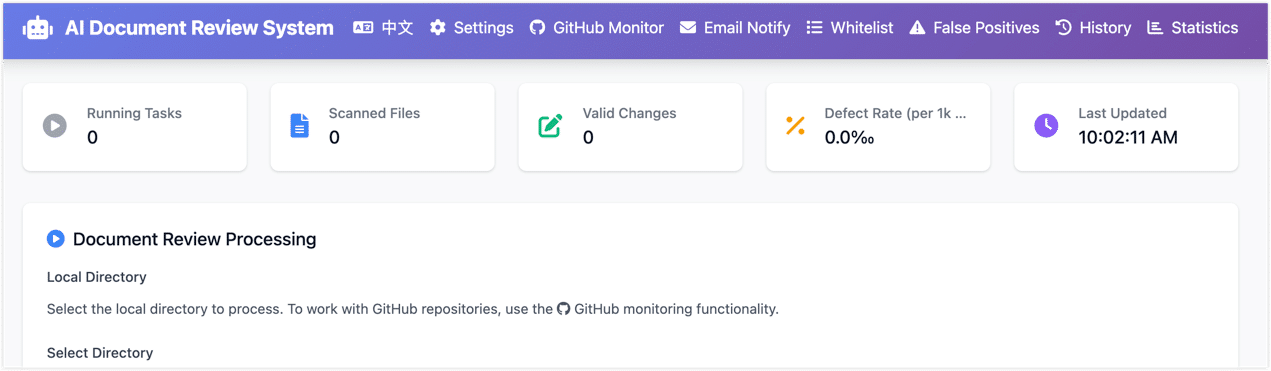
DocSifter scans directories of Markdown, AsciiDoc, and plain-text files, runs them through a rule engine and a local Chinese small model, flags typos, terminology mistakes, and phrasing issues, and generates a self-contained HTML report with per-finding diffs and quality metrics. It works from the CLI, a web UI, or a signed GitHub PR webhook.
If you followed the earlier architecture posts, you already know the core concept. This post dives into the engineering trade-offs behind the release and how to get it running locally.
Why build something custom
There's no shortage of Chinese text correction tools. The problem isn't capability — it's fit.
Generic correction tools fall apart on technical documentation. A grammar checker that sees deprecated will often suggest depreciated — both words exist in English, both look plausible, but in an API reference they mean completely different things. The same tool will confidently change principal to principle anywhere it appears in your IAM docs, rewrite code comments, or alter product names that happen to resemble common dictionary words. The damage is the kind that slips past a quick scan.
Cloud LLMs can handle the nuance — but technical documentation regularly contains unreleased features, internal architecture, customer data, and config examples. Routing that content through an external service is a conversation most teams have to have with their legal or security teams first. For basic proofreading, solving it locally removes the conversation entirely. And purely rule-based tools can't catch context-dependent language issues.
The core problem: a Chinese technical doc mixes YAML configs, shell commands, API parameter names, AsciiDoc or Markdown syntax, and product terminology in the same file. The tool needs to know what to read and what to leave completely alone.
The three-layer pipeline
The review runs in layers, lightest to heaviest, each optional:
Layer 1 — Rule preview
  └─ Deterministic issues: repeated words, punctuation spacing, fixed terminology
  └─ No model download required, results in seconds

Layer 2 — Local small-model correction
  └─ shibing624/chinese-text-correction-1.5b (default) or 7B
  └─ Fully offline, runs on CPU or GPU

Layer 3 — LLM second pass (optional)
  └─ Validates model findings before they reach the report
  └─ Works with any OpenAI-compatible endpoint, including self-hosted
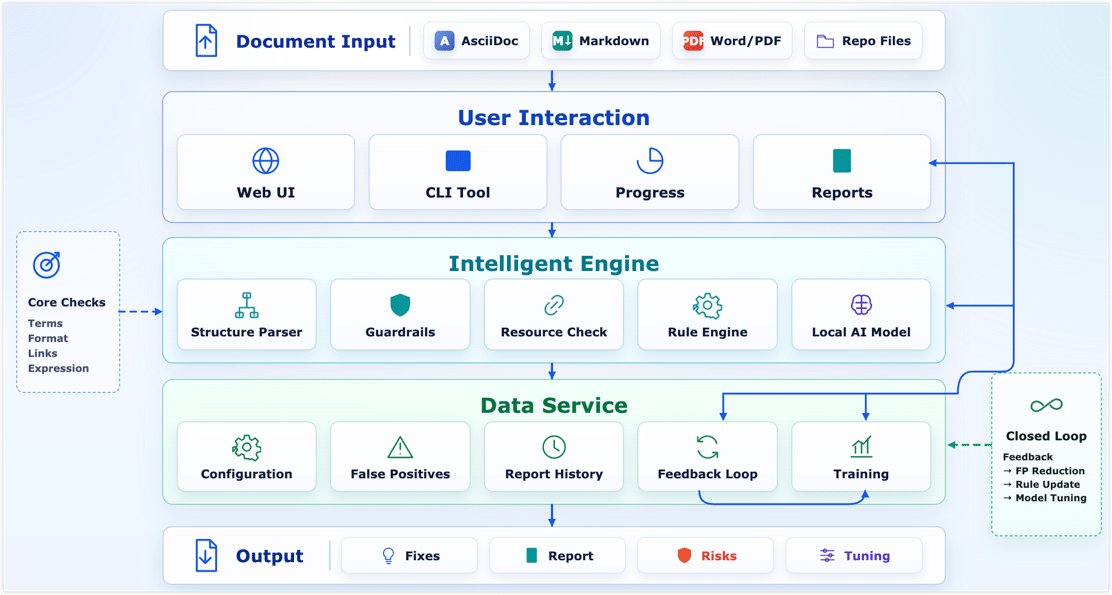
Layer 1 has no model dependency — install and run. Layer 2 is the main path for catching the things rules miss. Layer 3 exists for one specific situation: "the small model flagged this, but is it actually wrong?" — a larger model checks each finding and marks it confirmed or rejected before it hits the report. All three layers have independent switches; you can run just Layer 1 for a quick sanity check, or chain all three.
A few design decisions worth explaining
Data stays local — not "local deployment" as a euphemism
A lot of tools claim "local deployment" but are really just moving the cloud API call to a private server. Here, local-first means: no network calls by default. The first run downloads model weights (~3.1 GB) and caches them; everything after that runs fully offline.
For documentation teams, this isn't a performance decision. It's what makes the tool possible to use at all in environments where external data transfer requires sign-off. If you want to use a hosted model for the Layer 3 second pass, that's a deliberate opt-in — configure an endpoint, and it sends only the flagged findings for validation, not the full document.
Protection runs before correction
Before any text reaches the model, the parser identifies what to protect: fenced code blocks, inline code, YAML and JSON snippets, link URLs, image paths, and API parameter names. The model only sees the filtered plain-text segments. Even if the model returns a bad suggestion, a post-processing check discards anything that touches protected content before it lands in the report.
This is the most important engineering decision in the system. It's also where direct LLM calls on raw documentation tend to break things in ways that aren't immediately obvious.
False positives are persistent, not ephemeral
What usually kills a text correction tool is false positives. If it keeps flagging your company's product names or internal technical terms as errors, the team stops using it.
Allowlists, forced-fix rules, and false-positive decisions are all stored locally as persistent data. When someone clicks "reject" on a suggestion in the web UI, that decision is saved and applied on every future scan. These records don't disappear on upgrade. Over time, they become more valuable than the tool itself — they encode the team's accumulated judgment about what's a real error in their specific domain.
The model backend is swappable
Local transformers is the default, but the backend can be replaced with Ollama or any OpenAI-compatible endpoint through environment variables, no code changes required. All backends share the same protection pipeline: code, URLs, and allowlisted terms are filtered out before the model call, regardless of which backend is running.
Getting started
Install and run with rule preview only (no model download):
pip install -e .
docsifter ./examples/sample-docs
Enable the local small model (downloads ~3.1 GB on first run):
pip install -r requirements-model.txt
docsifter ./examples/sample-docs --model shibing624/chinese-text-correction-1.5b
Web UI:
docsifter-web
# http://localhost:8080
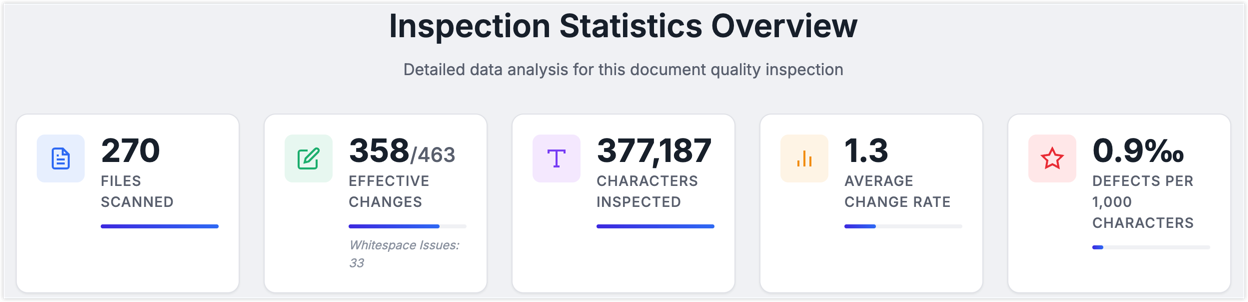
The scan produces a self-contained HTML report with line-level diffs, defect-rate metrics, and per-file breakdowns. The screenshots in the earlier posts are from this output — scanning a 380,000-character technical documentation corpus on an RTX 3060 took around 60 minutes, roughly 100 characters per second.
What it won't do
DocSifter handles surface-level text quality well. It won't tell you whether a product capability description is still accurate, whether a step-by-step procedure matches the current UI, or whether a statement in one doc contradicts something in another. That's a different class of problem — one that requires repository-wide context and a stronger model. I covered that layer in the first post in this series: pairing a local correction pass with Codex Cloud review at the PR stage.
The tool is also scoped to Chinese content. English prose review is out of scope for now.
In a Docs-as-Code workflow, there are three natural integration points: local CLI for a quick check while writing, web UI for a batch scan before opening a PR, GitHub webhook to automatically review only the changed files when a PR is created. Internally we use all three — rule preview is fast and cheap, the small model runs before we push, Codex handles the deeper check at PR time.
Why open source it now
Honestly, deciding to open source this took longer than the actual cleanup work.
Turning an internal tool into something a stranger can pick up and use means rethinking a lot of things: how configuration is structured, where security boundaries are, how to explain single-instance deployment constraints, whether the test coverage is honest. Going from a pile of functions in main.py to something with CI, Docker support, structured logging, and a Prometheus metrics endpoint at /metrics was a non-trivial refactor.
The reason is simple: when I went looking for engineering-level reference implementations of "local AI review for Chinese technical documentation," I found almost nothing. The system ran internally for close to a year and validated the basic approach. If it saves another team some of the initial exploration time, it's worth putting out.
GitHub: heywalter/docsifter
Questions and feature requests welcome via Issues. If your team is working on something similar — doc quality pipelines, local AI tooling for non-English content, Docs-as-Code workflows — I'd be curious to hear how you're approaching it.